If you sell on Amazon, you already know the pressure.
Your product photos need to be perfect. White background. Clean edges. No shadows. No distractions. Amazon’s image requirements are strict — and buyers make decisions in under three seconds.
That’s where a professional clipping path service makes all the difference.
In this guide, you’ll learn exactly what clipping path is, why Amazon sellers need it, what to look for in a service, and which types of images get the biggest results. We’ve also included a comparison table, pricing breakdown, and answers to the most common questions sellers have.
Let’s get into it.
What Is a Clipping Path? (And Why Amazon Sellers Need It)
A clipping path is a technique used in photo editing to isolate a product from its background. Think of it as drawing a precise outline around your item — then cutting everything else away.
The result? A clean, sharp product image on a pure white (or transparent) background.
Amazon requires this for most main product images. Their guidelines state:
- Pure white background (RGB 255, 255, 255)
- Product fills at least 85% of the image frame
- No additional text, logos, or watermarks
If your images don’t meet these standards, Amazon can suppress your listing. That means no visibility. No clicks. No sales.
A proper clipping path service solves this problem cleanly and quickly — at scale.
Why DIY Background Removal Often Fails
You might be thinking: “Can’t I just use an AI tool to remove the background?”
Sometimes, yes. For a single simple product on a plain background, AI tools can work reasonably well. But here’s when they fail — and they fail often:
- Complex edges: Jewellery, lace, fur, hair — AI struggles with fine details
- Transparent or reflective products: Glasses, bottles, glassware
- Multiple colors close together: The AI removes part of the product
- Consistency at scale: 500 products need to look uniform, not random
A human editor using manual clipping paths produces consistent, precise results every time. That’s what professional Amazon sellers rely on.
Amazon’s Exact Image Requirements (2026 Update)
Before hiring any service, understand what Amazon actually requires. Here’s a quick reference:
| Requirement | Specification |
|---|---|
| Background color | Pure white (RGB 255/255/255) |
| Minimum resolution | 1,000 x 1,000 pixels |
| Recommended resolution | 2,000 x 2,000 pixels or higher |
| Product frame coverage | At least 85% of the image |
| Accepted formats | JPEG, PNG, GIF, TIFF |
| Main image restrictions | No text, logos, borders, or mannequins |
Failing even one of these criteria can suppress your listing from search results. That’s lost revenue — sometimes significant.
What to Look for in a Clipping Path Service for Amazon
Not all image editing services are equal. Here’s what separates good from great when you’re selling on Amazon.
1. Manual Editing, Not Just AI
Ask directly: do human editors perform the clipping? AI tools cut corners. Manual Photoshop clipping paths are more precise, especially for complex products.
2. Turnaround Time
Amazon sellers often work to tight deadlines — product launches, Prime Day prep, seasonal inventory. Look for services that offer:
- Standard: 24–48 hours
- Rush: 6–12 hours
- Same day: For urgent needs
3. Revision Policy
Your satisfaction matters. Choose a service that offers unlimited free revisions. If the edges look slightly off or the white isn’t pure enough, you should be able to request corrections at no extra cost.
4. Bulk Pricing and Scalability
If you’re a private label seller with hundreds of SKUs, per-image pricing matters a lot. Look for tiered pricing:
| Volume | Expected Price Range |
|---|---|
| 1–50 images | $0.25 – $0.99 per image |
| 51–200 images | $0.20 – $0.70 per image |
| 200+ images | $0.15 – $0.50 per image |
5. Confidentiality
You’re uploading product photos before launch. A trustworthy service should have a clear data privacy policy — your images won’t be used anywhere else.
6. File Format Flexibility
You need JPEG for Amazon uploads. But having a transparent PNG version for your own website or future use is a major bonus. Check what formats the service delivers.
Types of Clipping Path Used for Amazon Products
Not every product needs the same level of editing. Here’s how clipping paths are typically categorized:
Simple Clipping Path
Best for: Products with straight or slightly curved edges.
Examples: Books, boxes, bottles, electronics.
Turnaround: Fast. Low cost.
Complex Clipping Path
Best for: Products with multiple curves, holes, or detailed shapes.
Examples: Chairs, footwear, bicycles, machinery.
Takes longer, slightly higher cost.
Multi Clipping Path
Best for: Products with multiple color zones that need separate editing.
Examples: Apparel with patterns, multicolor accessories, furniture.
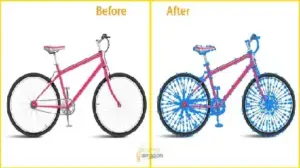
This technique lets you change individual color areas independently — extremely useful for Amazon A+ content and product variation images.
Hair & Fur Masking
Best for: Products with soft, irregular edges.
Examples: Stuffed animals, fur-lined jackets, wigs.
This technique preserves fine strands that a simple clipping path would cut off.
How the Process Works: Step by Step
Here’s what to expect when you order a clipping path service as an Amazon seller:
Step 1 — Upload Your Images
Most services accept JPG, PNG, PSD, TIFF, and RAW files. You can upload individual files or a ZIP folder for bulk orders.
Step 2 — Specify Your Requirements
Tell the editor what you need: pure white background, transparent PNG, specific output size, etc. Mention it’s for Amazon if you want them to apply the platform’s exact standards.
Step 3 — Editing Begins
A professional editor manually traces the product outline in Photoshop. This is done layer by layer, path by path.
Step 4 — Quality Check
Most services run a second pass. An editor or QA team reviews the cut-out for clean edges, correct white balance, and consistency across the batch.
Step 5 — Delivery
You receive the edited files in your chosen format, ready to upload directly to Seller Central.
Amazon Product Categories That Need Clipping Path the Most
Some categories simply cannot succeed on Amazon without clean, precise image editing. Here are the top ones:
Apparel & Fashion
Clothing images need clean backgrounds to look professional. Ghost mannequin and background removal are standard for this category.
Jewellery & Accessories
Rings, necklaces, and earrings have intricate edges. A precise clipping path preserves sparkle and fine detail.
Electronics & Gadgets
Sleek devices need sharp, clean cutouts. Reflective surfaces need careful handling.
Home & Kitchen
Furniture, cookware, and decor often have complex shapes that require skilled manual editing.
Beauty & Personal Care
Bottles, tubes, and packaging need white backgrounds and precise label visibility.
Toys & Baby Products
Multicolor products often need multi-path editing to look right in listings.
What Happens When You Use Poor-Quality Images on Amazon
Let’s look at this from a seller’s perspective.
Say you upload images with rough edges, gray backgrounds, or inconsistent lighting. Here’s what typically happens:
- Lower click-through rate (CTR): Buyers scroll past unappealing thumbnails
- Higher return rate: Products that look different from the image drive returns
- Listing suppression risk: Amazon actively scans for non-compliant images
- Weakened brand trust: Inconsistent photos suggest lower product quality
A 2023 study by Baymard Institute found that 56% of online shoppers consider product image quality the most important factor in their buying decision. On Amazon, that number is likely even higher — because text and reviews matter, but the image is the first thing someone sees.
Investing in proper clipping path work isn’t optional for serious sellers. It’s part of your listing strategy.
Tips for Amazon Sellers: Getting the Best Results
Here are practical tips to get the most out of any clipping path service you use.
Shoot on a light gray or white background
It makes removal faster and cleaner. Pure white backgrounds also mean less editing time — which means lower cost.
Use high-resolution originals
Don’t submit a 500px image and expect a 2,000px output. Always shoot at full resolution and let the editor work with maximum detail.
Request transparent PNGs alongside JPEGs
JPEGs work for Amazon. But transparent PNGs give you flexibility for your website, social media, and future design work.
Send a reference sample
If you have a specific style or edge quality in mind, send one image as a reference. It removes guesswork and speeds up revisions.
Order a trial first
Before committing to 500 images, send 2–5 to test quality and turnaround time. Most reputable services offer a free trial on sample images.
Organize your files before uploading
Name your files clearly (e.g., product-name-SKU-001.jpg). It helps both you and the editor stay organized — especially for bulk orders.
What About Multi-Path Editing for Amazon Variation Listings?
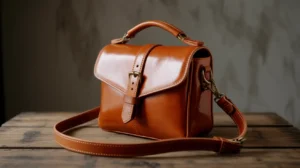
If you sell products with multiple color variations — say, a handbag in red, blue, and black — you don’t need to photograph each color separately.
With multi clipping path editing, a single image can be recolored accurately in each variant. Each color zone is isolated separately. This saves time on photography and keeps your listing images consistent.
This technique is especially popular for:
- Apparel with multiple colorways
- Furniture sold in multiple fabric or finish options
- Accessories with color variants
- Packaging with different label colors
For Amazon variation listings, this is a highly efficient approach.
Choosing Between Offshore and Local Services
Many Amazon sellers in the USA, UK, and Canada wonder: should I use a local editing service or an offshore one?
Here’s an honest breakdown:
| Factor | Local Service | Offshore Service |
|---|---|---|
| Cost | Higher ($1–$5+ per image) | Lower ($0.25–$0.99 per image) |
| Communication | Easy, same time zone | May require async coordination |
| Quality | Varies widely | Varies widely |
| Turnaround | Often slower (smaller teams) | Often faster (larger teams, 24/7) |
| Best for | Small, high-end projects | Volume-based Amazon operations |
The honest truth: location matters less than the quality of the editors and the process. A well-run offshore studio with 300+ editors and strict QA processes can outperform a local freelancer on both quality and speed.
What matters is: do they do manual editing? Do they offer revisions? Can they handle your volume?
Pricing Breakdown: What Amazon Sellers Actually Pay
Here’s a realistic pricing overview for clipping path services, based on typical market rates:
| Service Type | Price Range (Per Image) |
|---|---|
| Simple background removal | $0.25 – $0.49 |
| Complex clipping path | $0.49 – $1.50 |
| Multi-path editing | $1.00 – $3.00 |
| Hair / fur masking | $0.49 – $2.00 |
| Shadow creation | $0.19 – $0.99 |
| Ghost mannequin | $0.49 – $3.00 |
| Color correction | $0.49 – $1.00 |
For bulk orders (500+ images), most services offer significant discounts. Always ask about volume pricing before placing a large order.
Red Flags to Watch Out For
Here are warning signs that a clipping path service might not be right for your Amazon business:
- No sample work or portfolio: If they can’t show you examples, walk away
- No revision policy: Quality work comes with the confidence to fix it
- Vague turnaround times: You need predictability for launch schedules
- Fully automated only: AI-only services won’t handle complex products reliably
- No data privacy policy: You’re trusting them with unpublished product images
- No customer support: You need someone to contact if something goes wrong
Frequently Asked Questions
Does Amazon require clipping path on all product images?
Amazon requires pure white backgrounds on main product images. Whether you use clipping path, background replacement, or any other method doesn’t matter — the result must meet their technical spec. Clipping path is the most reliable way to achieve it.
Can I use a clipping path service for all Amazon image types?
Yes. Beyond the main image, your secondary and lifestyle images can also benefit from background removal or precise cutouts. Clean images across all slots improve overall listing quality.
How long does a batch of 100 product images take?
Most professional services deliver 100 images within 24 hours. Rush options exist if you need them in 6–12 hours, sometimes at a small premium.
Is it worth paying more for manual editing vs AI tools?
For Amazon sellers, yes. AI tools are improving, but they still fail on reflective, transparent, or edge-complex products. Manual editing gives you consistent, precise results that meet Amazon’s strict image standards.
What file format should I request?
For Amazon: JPEG with white background (RGB 255/255/255). For your own use: also request a transparent PNG. This gives you flexibility for website and social use.
Do services sign NDAs or have confidentiality agreements?
Reputable services have clear data privacy policies. Your images are used only for your project and never shared, published, or used in marketing without your consent.
Can clipping path improve my Amazon conversion rate?
Directly, yes. Clean, professional product images reduce buyer hesitation. Research consistently shows that high-quality images improve click-through rates and reduce returns — both of which directly affect conversion rate and ranking on Amazon.
Final Thoughts
Selling on Amazon in 2026 is more competitive than ever. Buyers have more choices. Their expectations are higher. And Amazon’s own algorithm rewards listings that convert well.
Your images are your first impression. A clean, professionally edited product photo on a pure white background builds instant trust. It signals quality before a buyer reads a single word of your listing.
That’s what a professional clipping path service delivers.
Whether you’re launching your first private label product or managing a catalog of thousands of SKUs, outsourcing your image editing to skilled professionals is one of the highest-ROI decisions you can make as an Amazon seller.
Start with a small trial batch. Test the quality. Then scale what works.
Related Resources: