In the world of online shopping, customers cannot touch your products. They cannot feel the fabric. They cannot see the build quality in person. All they have are your photos.
Research shows that over 75% of online shoppers rely heavily on product images when deciding whether to buy. High-quality ecommerce product photography is your most powerful sales tool. It builds trust instantly. If your images look cheap, your brand looks cheap. If your images look professional, your conversion rates will climb.
In this comprehensive product photography guide, we explore how to master your visuals. We will look at 50 real-world examples and the techniques that make them successful.
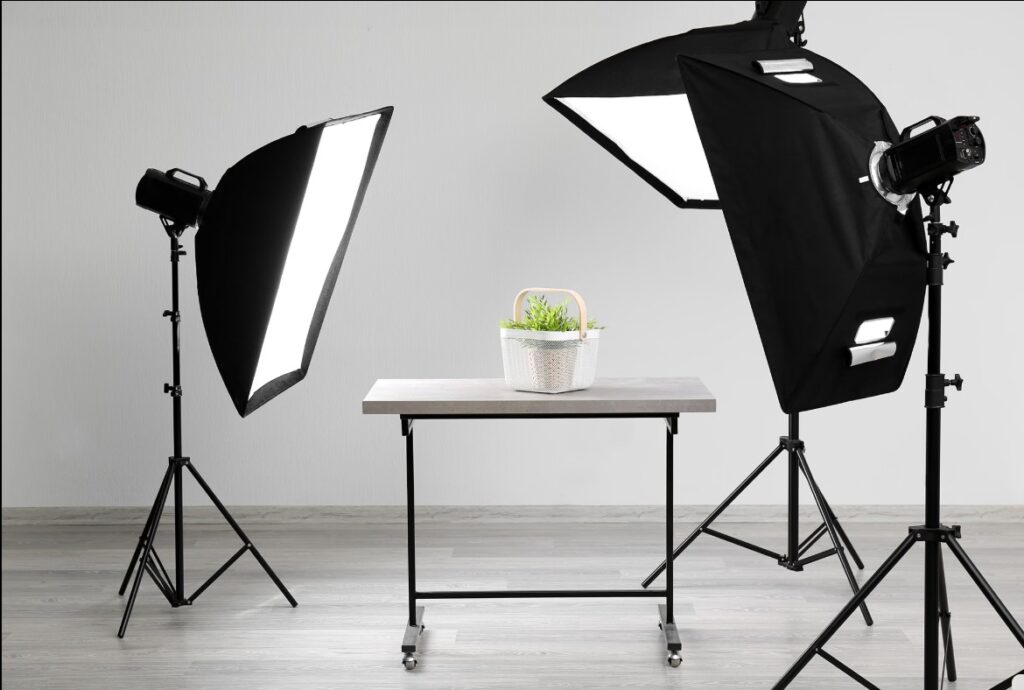
What Is E-commerce Product Photography?
Product photography is the art of taking professional images of items for sale. These images highlight features, textures, and details. In e-commerce, these photos replace the physical experience of a retail store. High-quality visuals bridge the gap between curiosity and a completed sale.
Why E-commerce Product Photography Matters for Online Sales
Photos are more than just pictures. They are the bridge between a customer’s curiosity and a completed sale. High-quality ecommerce product images are essential for any successful online store.
According to Shopify, high-quality product images can increase conversion rates by up to 30%. Furthermore, studies by the Baymard Institute show that shoppers rely heavily on visual information to verify product details. In fact, 22% of product returns occur because the item looks different from the photos online.
The Psychology Behind Product Images
Humans are visual creatures. We process images 60,000 times faster than text. When a visitor lands on your site, they judge your brand in milliseconds. Clean, crisp photos signal reliability and quality.
How Product Photos Affect Conversion Rates
Good photography reduces “buyer’s remorse.” When customers see exactly what they are getting from every angle, they feel confident. High-quality images lead to fewer returns and more “Add to Cart” clicks.
Product Photography Workflow: Step-by-Step
Google loves a clear process. Before we dive into the checklist, here is the standard professional workflow:
- Plan the shoot: Decide on the angles and style (lifestyle vs. white background).
- Clean and prepare the product: Ensure the item is flawless.
- Set up lighting: Position your lights to highlight textures.
- Capture multiple angles: Take more shots than you think you need.
- Edit and retouch photos: Fix colors and remove backgrounds.
- Export optimized images for web: Compress files for fast loading.
7 Types of Product Photography You Must Know
To build a complete guide, you need to understand the different styles used in the industry:
- White Background Photography: The standard for Amazon. It removes distractions.
- Lifestyle Photography: Shows the product in a real-life setting. It tells a story.
- Scale Shots: Helps customers understand the size of the item.
- Detail/Macro Shots: Focuses on small textures and intricate features.
- 360-Degree Photography: Allows users to rotate the product digitally.
- Group Shots: Shows multiple products or variations together.
- Packaging Shots: Displays the product along with its box for a premium feel.
E-commerce Product Photography Checklist: 5 Steps to Perfection
Even the best lighting can’t fix a dirty product. Before you press the shutter, you must prepare your stage. Follow this quick checklist to save hours in post-production.
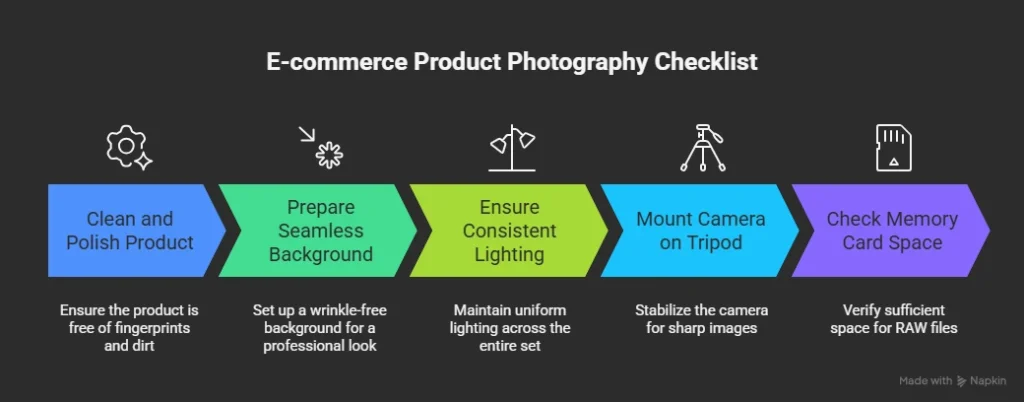
1. Polish to Perfection
Dust and fingerprints are a camera’s worst enemy. Use a microfiber cloth to wipe your product thoroughly. This is especially vital for glass, jewelry, or metallic items. A clean product means less retouching later.
2. Smooth Out the Background
Your backdrop must be seamless. Creases or wrinkles distract the customer’s eye. Ensure your white sweep or fabric is pulled tight and clean. A flawless background makes your product “pop” off the screen.
3. Lockdown Your Lighting
Consistency is the key to a professional store. Ensure your lights are positioned correctly and won’t move. If using natural light, work fast before the sun shifts. Consistent lighting makes your entire collection look uniform.
4. Stabilize with a Tripod
Sharpness is non-negotiable. Even a tiny handshake can cause blur. Mount your camera or smartphone on a steady tripod. It allows for longer exposures and guarantees the same angle for every shot.
5. Gear Up for RAW
Always shoot in RAW format. These files hold more data for color correction and detail recovery. Before starting, double-check that your memory card has plenty of space. You don’t want to stop mid-flow to delete old files!
Pro Tip: Following these steps ensures your images are “retail-ready” the moment they hit your computer.
Best Camera Settings for Product Photography
Actionable details make the difference. To get that “pro” look, use these recommended camera settings:
- Aperture: $f/8$ to $f/11$ (keeps the entire product sharp).
- ISO: 100 to 200 (minimizes digital noise/grain).
- Shutter Speed: 1/125 or slower (use a tripod to prevent blur).
- White Balance: 5500K (Daylight) for true color accuracy.
- Format: RAW (essential for high-quality product image editing).
Best Equipment for E-commerce Product Photography
To capture high-quality ecommerce product images, you need the right tools. Here is the pro-level product photography equipment list:
- Camera: A full-frame Mirrorless or DSLR like the Sony A7 series or Canon EOS R.
- Lens: A 50mm prime lens for standard shots or a 100mm macro lens for small details.
- Lighting: Softbox LED kits provide even, diffused light.
- Tripod: An adjustable studio tripod ensures 100% stability.
- Backdrop: A seamless paper roll creates a clean, professional “infinity” look.
- Reflectors: White or silver foam boards to bounce light into shadows.
DIY Product Photography Setup Under $100
You don’t need a Hollywood budget for a great product photography setup.
- The Camera: Your modern smartphone.
- The Backdrop: A roll of white craft paper ($10).
- The Light: Two LED desk lamps with daylight bulbs ($40).
- The Reflector: White foam board from a craft store ($5).
- The Tripod: A basic smartphone tripod ($20).
Product Photography Lighting Techniques
Mastering light is the secret to great e-commerce product images.
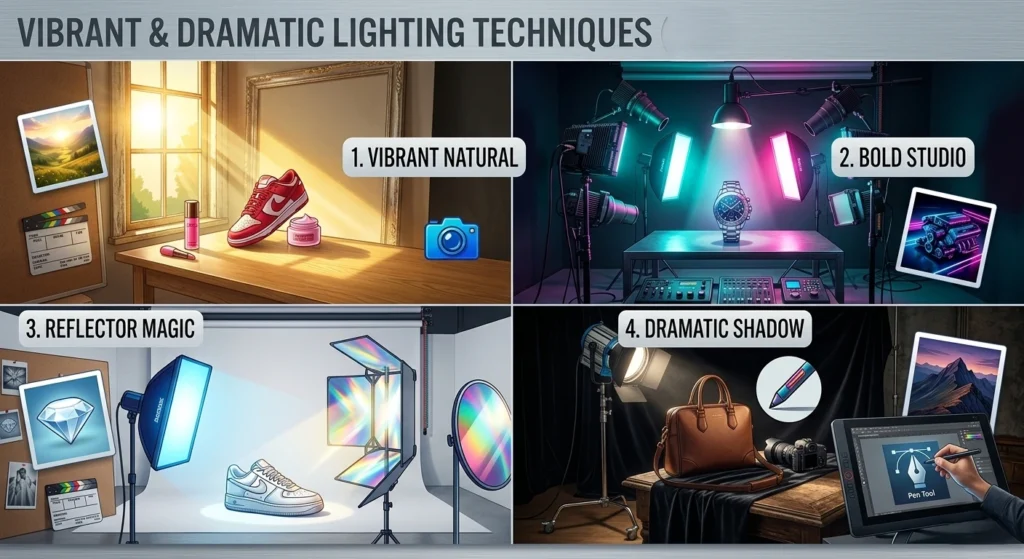
Natural Lighting
This is the best budget-friendly option. Use a large window during the day. It creates a soft, organic look perfect for social media.
Studio Lighting
For 100% consistency, use artificial lights. This is essential for large catalogs. It ensures every photo looks exactly the same.
Reflector Usage
A reflector bounces light back onto the product. It fills in dark shadows without needing another lamp.
Shadow Creation
Sometimes, you want a subtle shadow. This adds depth. Professional editors can also add realistic shadow creation services later to give your product a 3D feel.
50 E-commerce Product Photography Examples by Industry
In the world of online shopping, photos do the talking. Let’s look at the brands doing it right.
Fashion & Footwear
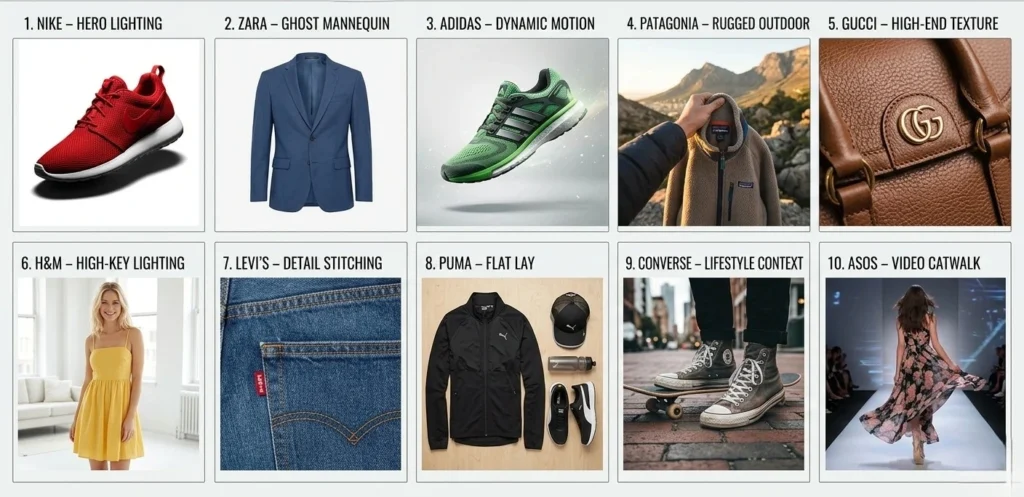
- Nike – Hero Lighting: High-contrast lighting on a white background makes the texture pop.
- Zara – Ghost Mannequin: Shows the fit of clothes without a distracting model.
- Adidas – Dynamic Motion: Captures shoes in mid-air to show energy and speed.
- Patagonia – Rugged Outdoor: Uses natural sunlight to match their eco-friendly vibe.
- Gucci – High-End Texture: Close-ups of leather grains to show extreme luxury.
- H&M – High-Key Lighting: Bright, airy shots that feel accessible and trendy.
- Levi’s – Detail Stitching: Focuses on the quality of denim seams and rivets.
- Puma – Flat Lay: Arranges athletic gear from above for a clean, organized look.
- Converse – Lifestyle Context: Shoes worn in an urban street setting.
- ASOS – Video Catwalk: Shows how the fabric moves on a real person.
Jewelry & Luxury
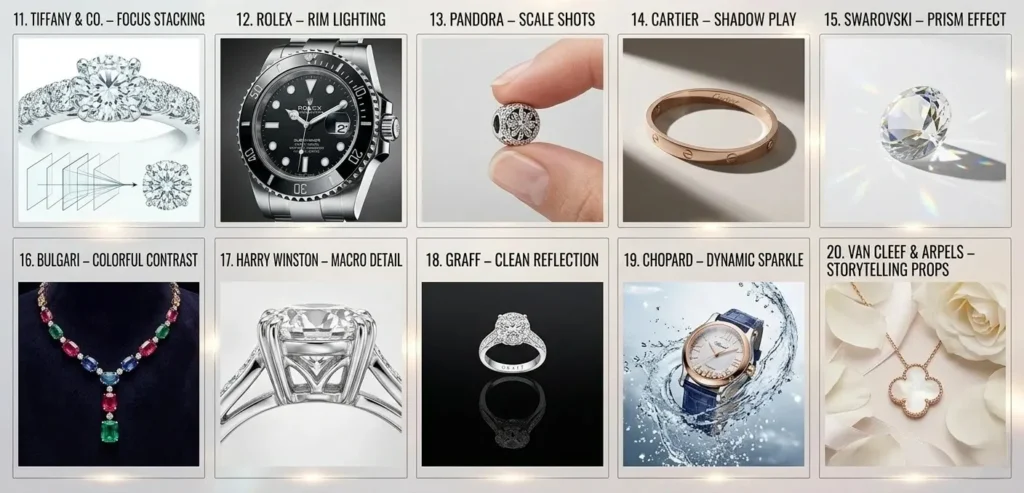
- Tiffany & Co. – Focus Stacking: Keeps every tiny diamond facet perfectly sharp.
- Rolex – Rim Lighting: Highlights the sleek metal edges of a watch face.
- Pandora – Scale Shots: A charm next to a finger shows its exact size.
- Cartier – Shadow Play: Uses elegant shadows to give jewelry a 3D feel.
- Swarovski – Prism Effect: Captures rainbows reflecting off crystals.
- Bulgari – Colorful Contrast: Bright gems against a deep, dark background.
- Harry Winston – Macro Detail: Shows the intricate setting behind the stone.
- Graff – Clean Reflection: Placed on a black mirror for a symmetrical look.
- Chopard – Dynamic Sparkle: High-speed shots of watches moving through water.
- Van Cleef & Arpels – Storytelling Props: Jewelry placed on flowers or silk.
Beauty & Cosmetics
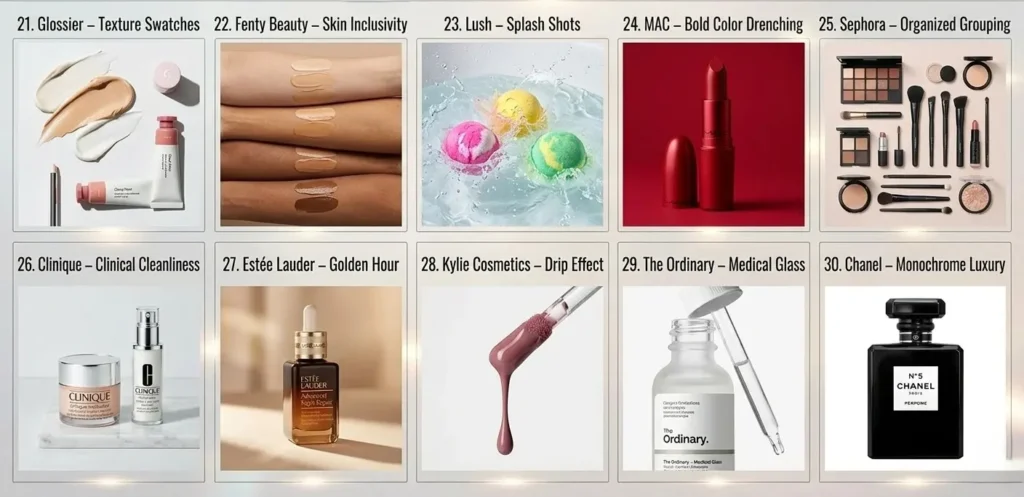
- Glossier – Texture Swatches: Smears of cream help the customer “feel” the product.
- Fenty Beauty – Skin Inclusivity: Swatches on many skin tones for accuracy.
- Lush – Splash Shots: Vibrant bath bombs fizzing in real-time.
- MAC – Bold Color Drenching: Lipstick against a matching color background.
- Sephora – Organized Grouping: Shows a full makeup kit in a neat grid.
- Clinique – Clinical Cleanliness: Minimalist shots on white marble surfaces.
- Estée Lauder – Golden Hour: Soft, warm light for anti-aging serums.
- Kylie Cosmetics – Drip Effect: Shows liquid lipstick dripping for visual drama.
- The Ordinary – Medical Glass: Focuses on the lab-style glass droppers.
- Chanel – Monochrome Luxury: Pure black and white shots for perfume.
Electronics & Tech
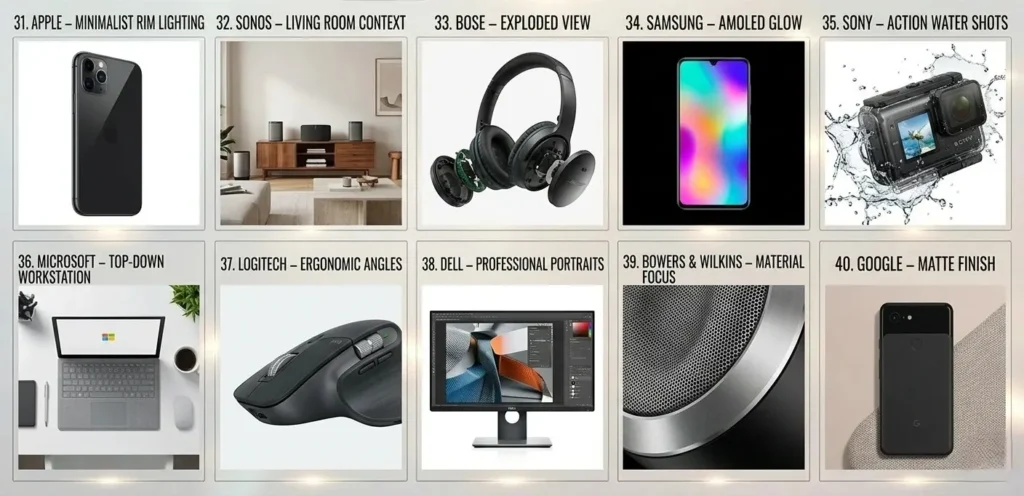
- Apple – Minimalist Rim Lighting: Makes tech look futuristic and sleek.
- Sonos – Living Room Context: Shows speakers in a modern home setting.
- Bose – Exploded View: Shows the internal parts of a headphone.
- Samsung – AMOLED Glow: Screen photos that show off vibrant colors.
- Sony – Action Water Shots: Waterproof cameras being splashed.
- Microsoft – Top-Down Workstation: A laptop in a clean office setup.
- Logitech – Ergonomic Angles: Focuses on the curve of a mouse.
- Dell – Professional Portraits: Monitors showing high-resolution design work.
- Bowers & Wilkins – Material Focus: Close-ups of mesh and aluminum.
- Google – Matte Finish: Highlights the soft-touch texture of Pixel phones.
Food & Beverage
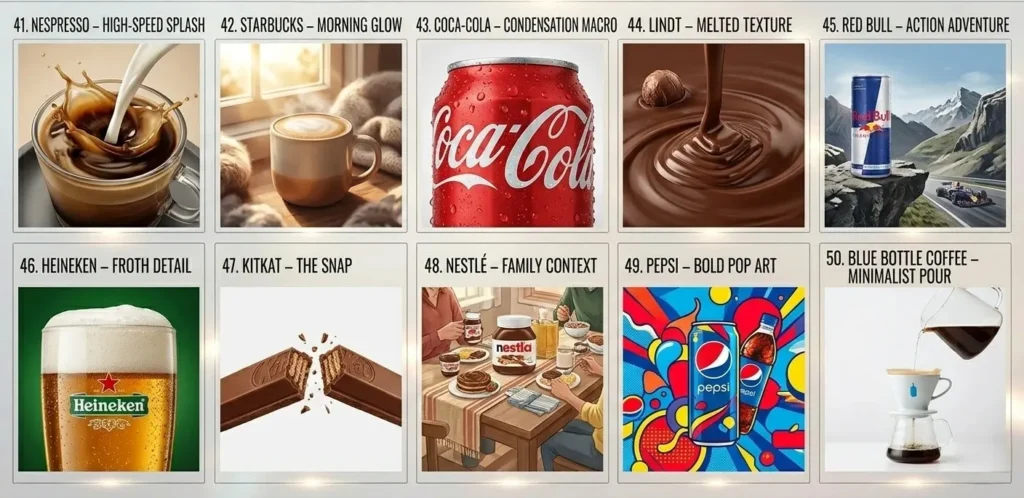
- Nespresso – High-Speed Splash: Captures milk hitting coffee in a swirl.
- Starbucks – Morning Glow: Natural light hitting a warm cup of latte.
- Coca-Cola – Condensation Macro: Cold water droplets on a red can.
- Lindt – Melted Texture: Shows the smooth flow of liquid chocolate.
- Red Bull – Action Adventure: Drinks are placed on a mountain or at a race.
- Heineken – Froth Detail: Focuses on the perfect head of a beer.
- KitKat – The Snap: High shutter speed shot of the bar breaking.
- Nestlé – Family Context: Food placed on a cozy dining table.
- Pepsi – Bold Pop Art: Uses bright, saturated colors for a young vibe.
- Blue Bottle Coffee – Minimalist Pour: Focuses on the stream of water.
Product Photography for Amazon & Shopify
Product Photography for Amazon Listings
Amazon requires your main image to have a pure white background (RGB 255, 255, 255). The product should fill 85% of the frame. No watermarks or extra text allowed.
Product Photography for Shopify Stores
Shopify allows more creativity. Use lifestyle images to build a brand vibe. However, keep your aspect ratios consistent to ensure your collection pages look organized.
Product Image SEO (Very Important)
Google doesn’t just “see” images; it reads them. Follow these steps for better rankings:
- File Names: Rename IMG_001.jpg to black-nike-running-shoes.jpg.
- Alt Text: Describe the image for search engines (e.g., “Men’s black Nike running shoe side view”).
- Image Compression: Use WebP format to keep files small and speed up high-quality.
- Lazy Loading: Ensures images load only when they appear on the screen.
Best Product Photo Editing Tools
- Adobe Photoshop: The industry standard for complex retouching and clipping paths.
- Adobe Lightroom: Best for batch processing and color correction.
- Capture One: Preferred by many professionals for high-end tethered shooting.
- Canva: A great, easy-to-use tool for adding lifestyle overlays.
Product Photo Editing Techniques for E-commerce
Even the best photos need professional help. Here is how we elevate your images:
- Background Removal: Removes messy backgrounds for a clean finish.
- Clipping Path: Uses manual pen tools for 100% precision on edges.
- Color Correction: Ensures the digital color matches the real product.
- Dust & Scratch Cleanup: Removes tiny imperfections for a high-end look.
Common Product Photography Mistakes to Avoid
- Harsh Shadows: Avoid direct, un-diffused light.
- Inconsistent Backgrounds: Keep a uniform look across your site.
- Low Resolution: Never use blurry or pixelated images.
- Wrong White Balance: Don’t let your white backgrounds look yellow or blue.
AI in Product Photography (2026 Trend)
AI is now a tool for efficiency.
- AI Background Generation: Instantly place studio shots into lifestyle settings.
- AI Shadow Creation: Generates realistic shadows based on shape.
- AI Upscaling: Enhances low-resolution photos for 4K displays.
FAQs
What resolution is best for product photography?
Aim for at least 2000px on the longest side. This allows for high-quality zoom features.
Can I shoot with a smartphone?
Yes. Modern iPhones and Androids are capable of producing professional results with good lighting and a tripod.
How many images should I have per product?
Aim for 5 to 7. Include a hero shot, side profile, back view, and a lifestyle shot.
What background color is best for product photography?
White backgrounds work best for marketplaces like Amazon because they remove distractions and maintain visual consistency.
Do product photos affect SEO rankings?
Yes. Proper file names, alt text, and compression allow images to appear in Google Image Search.
What file format is best for e-commerce images?
WebP provides excellent compression while maintaining high image quality.
Final Thoughts
High-quality ecommerce product photography is no longer optional. In crowded marketplaces like Amazon and Shopify, images are the only factor separating a sale from a bounce.
By mastering lighting, settings, and editing, brands can build trust and increase conversions. Whether you shoot yourself or use a professional service, investing in quality visuals always delivers the highest return.