The world of e-commerce fashion is moving faster than ever. In 2026, high-quality visuals are no longer optional. They are the heartbeat of your online store. To stand out, clothing brands must present their products with precision and style. This is where professional ghost mannequin photo editing services become a game-changer for e-commerce fashion brands.
Instead of flat, lifeless photos, brands now use the invisible mannequin photo editing technique. This process gives garments a 3D, “worn” look without a distracting model. Whether you sell on Amazon, Shopify, or your own boutique site, professional clothing product photography is essential. It builds trust. It shows customers exactly how a piece of clothing hangs on a human body.
What Is a Ghost Mannequin in Product Photography?
A ghost mannequin is a visual illusion. It makes a piece of clothing look like an invisible person is wearing it. In apparel product photography, you take photos of a garment on a mannequin. Then, in post-production, the mannequin is digitally removed.
The result is a hollow, lifelike shape. This highlights the fit and fabric perfectly. This is the core of the ghost mannequin photography effect. It is the gold standard for fashion product photography. It keeps the focus entirely on the clothes, not the background.
Why Ghost Mannequin Photo Editing Is Important for E-commerce
First impressions matter. In a crowded digital market, ghost mannequin photo editing gives your brand a professional edge. Here is why it is vital:
- Realistic Shape: It shows the true fit and drape of the garment.
- Consistency: It creates a uniform look across your catalog.
- Better Conversions: Customers buy more when they see the 3D fit.
- Platform Ready: Amazon and Shopify prefer clean ecommerce product images.
How to Photograph Clothing for Ghost Mannequin Editing
Before editing begins, proper photography is essential. You cannot fix a bad photo easily. If you want to know how to photograph ghost mannequin styles, follow these best practices:
- Use a Professional Mannequin: Choose a matte white mannequin. This helps you avoid unwanted reflections.
- Use Soft Lighting: Two softboxes at 45° angles help remove harsh shadows. This is the best ghost mannequin photography setup.
- Capture Multiple Shots: Take at least three images. You need a front image, a back image, and an inner neck shot.
- Use a Tripod: A tripod ensures consistent framing. This makes the invisible mannequin service much more accurate.
How Ghost Mannequin Photo Editing Works (Step-by-Step)
Creating the perfect invisible mannequin effect is a technical process. It requires both photography skills and expert garment photo editing.
Front Photo of the Garment
First, the photographer captures the clothing on a physical mannequin. This provides the primary shape.
Inside / Neck Joint Photo Capture
The mannequin hides the inner collar. To fix this, a separate photo is taken of the garment’s interior.
Photoshop Editing Process
The editor combines these images using Adobe Photoshop. They carefully cut out the mannequin and merged the front with the inner neck view.
Creating the Invisible Mannequin Effect
The final step is neck joint editing. This closes the gaps and adds natural shadows. The garment now looks like it is floating in 3D space.
Professional Ghost Mannequin Editing Workflow
Most editing teams follow this workflow for clothing photo retouching:
- Import RAW images: Starting with high-res files preserves detail.
- Create clipping path: Hand-drawn paths ensure clean edges.
- Remove mannequin: Deleting the physical mannequin from the frame.
- Merge inner neck shot: Attaching the collar view for the 3D look.
- Adjust garment shape: Using the liquify tool for symmetry.
- Color correction: Matching colors to the physical product.
- Add natural shadow: Creating depth so the item looks real.
- Export optimized web images: Finalizing files for Shopify or Amazon.
Tools Used for Professional Ghost Mannequin Editing
Professional editors rely on advanced tools to create a perfect invisible mannequin effect. We use:
- Adobe Photoshop: The industry standard for apparel photo retouching.
- Pen Tool: Essential for creating precise clipping paths.
- Layer Masking: To blend the neck joint seamlessly.
- Clone Stamp & Healing Brush: To remove wrinkles or dust.
- Dodge & Burn: To enhance depth and texture.
- Liquify Tool: For perfect garment shaping.
Common Ghost Mannequin Editing Mistakes
Many beginners struggle with invisible mannequin editing. Common problems include:
- Misaligned neck joints: The front and back collars don’t match.
- Missing inner collar details: Forgetting to show the tag or lining.
- Over-retouched fabric: Removing so many wrinkles, the fabric looks like plastic.
- Unrealistic shadows: Shadows that go in the wrong direction.
- Poor garment shaping: The item looks tilted or warped.
Professional editors focus on natural fabric flow and realistic depth.
Types of Ghost Mannequin Services
Not every garment is the same. Different items require different editing styles.
- Full Ghost Mannequin Editing: Best for jackets, suits, and long dresses.
- Half Mannequin Effect: Ideal for t-shirts, shorts, or swimsuits.
- Neck Joint Service: Focusing specifically on the collar and tag area.
- 3D Ghost Mannequin Editing: Adding depth and shadows for a high-end feel.
Before and After Ghost Mannequin Editing
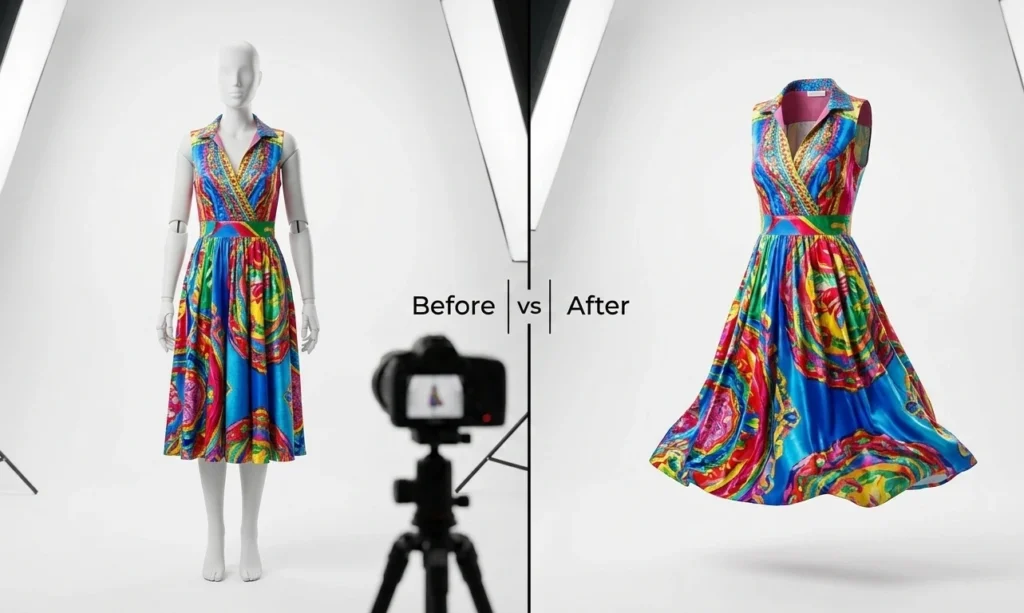
Professional editing removes the mannequin and adds the neck joint for a realistic look.
Image Optimization for E-commerce Websites
After apparel photo editing, images must be optimized. This is vital for e-commerce apparel photography.
- Format: Use WebP or JPEG for optimal performance.
- Resolution: Maintain 2000px resolution for high-quality zoom.
- File Size: Keep images under 300KB for fast loading.
- SEO Naming: Use keyword-rich file names. Example: ghost-mannequin-leather-jacket.jpg.
- Alt Text: Always use descriptive ALT text for Google indexing.
Key Benefits of Using an Invisible Mannequin Service
Choosing an invisible mannequin service saves time. It ensures experts handle your clothing product editing.
A clean image keeps the focus on your design. This leads to a higher e-commerce conversion rate. With consistent apparel photo editing, your brand looks established.
Ghost Mannequin vs 3D Clothing Rendering
| Feature | Ghost Mannequin | 3D Rendering |
| Cost | Low to Moderate | High |
| Realism | Real garment texture | Computer-generated |
| Setup | Requires photography | Fully digital |
| Editing | Photoshop | 3D Software |
Most brands prefer photography for realistic fabric texture.
Ghost Mannequin vs Flat Lay vs Model Photography
| Photography Style | Pros | Cons |
| Ghost Mannequin | Professional 3D shape | Requires expert editing |
| Flat Lay | Cheap and simple | No body shape or fit |
| Model Photography | Great lifestyle appeal | Very expensive & slow |
Industries That Use Ghost Mannequin Photo Editing
Many businesses rely on clothing product photo editing:
- Fashion Brands: To maintain a high-end image.
- Apparel Manufacturers: To showcase designs to B2B clients.
- Online Clothing Stores: To show the garment’s fit.
- Amazon & eBay Sellers: To meet strict image standards.
- Shopify Store Owners: To create a boutique feel.
- Clothing Wholesalers: To process bulk catalogs quickly.
Professional Ghost Mannequin Photo Editing Services
When you hire a pro like Clipping Path Zone, you get:
- Ghost Mannequin / Neck Joint Editing: Merging photos for a 3D look.
- Background Removal: Placing items on a crisp white background.
- Shadow Creation: Adding natural shadows for depth.
- Color Correction: Matching colors to the real fabric.
- Apparel Retouching: Removing wrinkles, dust, or threads.
How to Choose the Best Ghost Mannequin Service Provider
Look for these key factors in a ghost mannequin service provider:
- Hand-Drawn Paths: Human-made paths are much cleaner than AI.
- Fast Turnaround: Look for 24-hour delivery.
- Bulk Capacity: Ensure they can handle hundreds of images.
- Pricing Transparency: Know the cost upfront.
- Experience: Check for high-end fashion portfolios.
Why Choose Clipping Path Zone for Ghost Mannequin Service
Clipping Path Zone is your ultimate partner for apparel photo editing.
- Photoshop Experts: Our team has 175+ highly skilled designers.
- 24/7 Support: We work around the clock for you.
- Lightning Fast: Get your images back in record time.
- Affordable Quality: Premium service at a low price.
- Free Trial: Test our quality for free first.
Start Your Free Ghost Mannequin Editing Trial Today! > [Upload Your First Image for a Free Ghost Mannequin Test] and see the difference.
Ghost Mannequin Service Pricing Guide
| Service Type | Starting Price |
| Basic Ghost Mannequin | $0.49 / image |
| Complex Apparel Editing | $0.99 / image |
| Bulk Editing (100+ images) | Custom Quote |
Frequently Asked Questions (FAQ)
What is ghost mannequin photo editing?
It is a process where a mannequin is removed from a photo. It leaves the clothing looking like an invisible person is wearing it.
How much does ghost mannequin service cost?
Prices usually start around $0.49 per image for basic items.
Is ghost mannequin photography better than model photography?
It is more affordable and consistent for product pages.
How long does ghost mannequin editing take?
Most professional services offer a 12 to 24-hour turnaround time.
Do e-commerce clothing brands use invisible mannequin editing?
Yes. Most major brands on Shopify and Amazon use an invisible mannequin service.
Final Thoughts
Mastering visuals is the key to e-commerce success. A professional ghost mannequin service transforms photos into sales tools. It provides the “invisible” look shoppers expect.
By investing in high-quality ghost mannequin photo editing, you build trust. You show the fit, the fabric, and the style. Whether you need an invisible mannequin service or complex 3D retouching, professional editing is the secret to a thriving brand.