Most e-commerce brands do not realise their product image workflow is broken until scaling exposes it.
At 50 products, inconsistency is invisible.
At 5,000 SKUs, it becomes a serious revenue problem.
A single inconsistent product image can quietly destroy customer trust across an entire e-commerce catalogue. Large SKU catalogues create editing bottlenecks. Inconsistent lighting causes colour drift. Rushed editors make sloppy cuts. Delayed edits push back product launches. And poor images? They quietly kill your conversion rates.
Studies from the Baymard Institute show that shoppers rely on product images more than descriptions when making purchase decisions online. A blurry photo, a mismatched background, or a fake-looking shadow can send a customer straight to a competitor.
The real problem is not speed. It is systems. Most teams try to scale by working faster. The smart move is to work smarter — with a repeatable, quality-first workflow.
This guide shows you exactly how to do it.
Key Takeaways
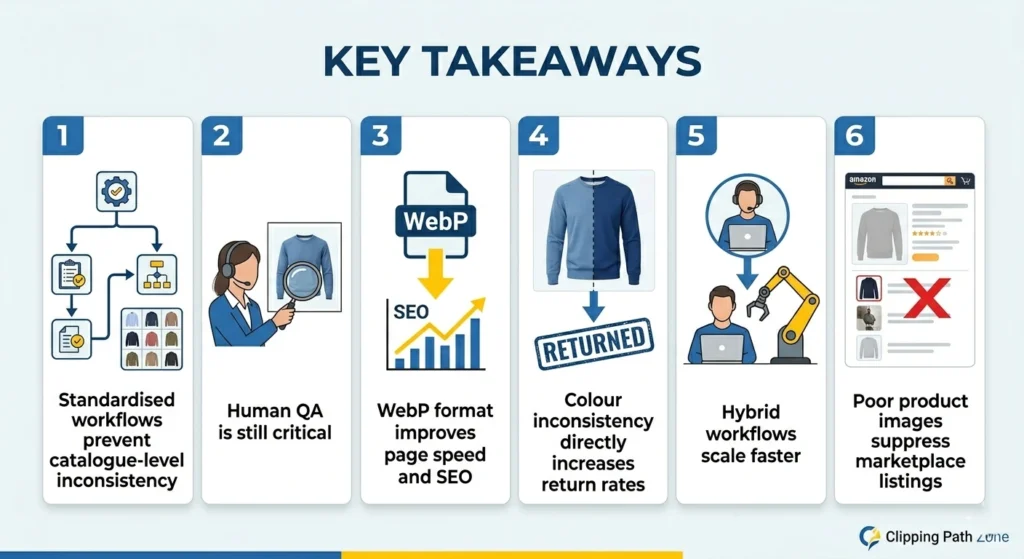
- Standardised workflows prevent catalogue-level inconsistency
- Human QA is still critical — despite improving AI tools
- WebP format improves both page speed and SEO rankings
- Colour inconsistency directly increases return rates
- Hybrid workflows scale faster than manual-only editing
- Poor product images suppress marketplace listings — not just conversions
Why Trust Clipping Path Zone
Before diving in, here is why this guide carries real operational weight.
Clipping Path Zone has been editing e-commerce product images since 2010.
That is over 15 years of hands-on production experience.
In that time, we have:
- Edited millions of product images across apparel, jewellery, furniture, cosmetics, and electronics
- Supported ecommerce sellers on Amazon, Shopify, Etsy, Walmart, and WooCommerce
- Operated a 24/7 production pipeline across three shifts with 175+ skilled designers
- Maintained a dedicated QA team of 50+ quality controllers
- Processed up to 10,000 images per day for high-volume catalogue clients
The insights in this guide come from real production floors — not theory.
Every problem described here is a problem we have solved, repeatedly, at scale.
Why E-commerce Photo Retouching Becomes Difficult at Scale
The Challenge of Managing Thousands of Product Images
One product? Easy. One hundred? Manageable. One thousand? That is where things fall apart.
At scale, small inconsistencies multiply fast. A slight background difference across 50 images becomes glaring across 5,000. A colour shift that looks minor on one product destroys trust across an entire catalogue.
Managing high-volume ecommerce image editing requires more than skilled editors. It requires structure, standards, and systems that run consistently — every single day.
Why Inconsistent Product Photos Damage Customer Trust
Shoppers make split-second decisions. When product images look inconsistent — different lighting, different backgrounds, different shadow styles — the catalogue feels low-quality.
That feeling transfers to the brand. And once trust is lost, conversions suffer.
How Poor Image Quality Impacts E-commerce Conversion Rates
According to Shopify’s own commerce research, high-quality product photography is one of the most important factors in increasing buyer confidence and reducing purchase hesitation online.
Blurry images, over-retouched photos, wrong colours, and poor backgrounds all reduce that confidence.
The image is often the only thing standing between a browser and a buyer.
The Hidden Cost of Delayed Product Launches
Every day a product sits without a published image is a day of lost revenue. Editing bottlenecks delay launches. Delayed launches cost sales. The longer a SKU waits for its images, the more money is left on the table.
The Real Cost of Poor E-Commerce Image Editing
Most brands measure retouching costs. Few measure the cost of bad retouching.
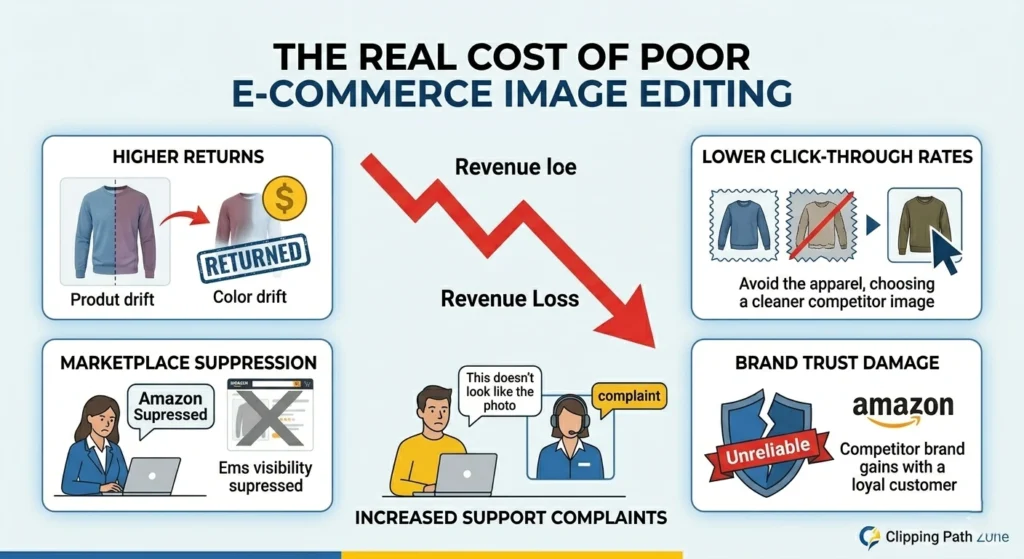
Here is what poor product image optimisation actually costs you:
Higher return rates. When product colours look different in person, customers return items. Colour-inaccurate images are one of the top reasons for ecommerce returns globally.
Lower click-through rates. Catalogue page thumbnails with inconsistent backgrounds, odd shadows, or poor cropping get skipped. Shoppers click the cleaner image — every time.
Marketplace listing suppression. Amazon automatically suppresses listings with non-compliant images from search results. According to Amazon’s seller documentation, main images must meet strict white background and minimum resolution requirements — or the listing disappears from search without notification.
Increased support complaints. “This doesn’t look like the photo” is one of the most common customer service complaints in e-commerce. It starts with the image.
Brand trust damage. A catalogue that looks inconsistent signals an unreliable brand. Shoppers notice. They do not always say why they left — they just do not come back.
“Most e-commerce image inconsistency comes from workflow problems, not editing skills. Fix the system, and the quality follows automatically.” — Senior QC Lead, Clipping Path Zone
How E-commerce Image Quality Impacts SEO
Most brands think product images only affect conversions. They are wrong.
Product images directly impact your SEO rankings, too.
Core Web Vitals: Google’s documentation on Core Web Vitals confirms that Largest Contentful Paint (LCP) — how fast your main product image loads — is a direct ranking factor. Unoptimized images slow LCP scores. Poor LCP scores lower your search rankings.
Bounce Rate: A slow-loading or poor-quality product page increases bounce rate. High bounce rate signals low page quality to Google. Lower rankings follow.
Mobile UX: According to Google’s mobile-first indexing guidelines, your mobile page performance directly determines how your site ranks across all devices. Over 60% of e-commerce traffic now comes from mobile. Large, uncompressed images create painful mobile experiences that hurt rankings.
Image Search Traffic: Properly optimised product images — correct alt text, descriptive filenames, WebP format — rank in Google Image Search. This drives additional organic traffic to product pages that most competitors completely ignore.
Page Engagement: Professional, consistent product images increase time on page. These engagement signals tell Google your page is valuable. The result is stronger rankings over time.
The bottom line: E-commerce image production quality is not just a visual decision. It is an SEO decision.
Common Bottlenecks by Team Size
Different teams hit different scaling walls. Here is where each one typically breaks down:
| Team Size | Most Common Problem |
| Solo seller | Time overload — editing delays product launches |
| Small team (2–5) | Inconsistent editing standards across editors |
| Mid-size brand | Workflow bottlenecks during seasonal peaks |
| Enterprise | Cross-team quality control failures at scale |
Knowing your bottleneck is the first step to solving it.
3 Mistakes We See in 80% of New E-commerce Catalogues
After editing millions of product images across thousands of e-commerce catalogues, patterns emerge.
These three mistakes appear in the vast majority of new catalogues we receive.
Mistake 1: No reference image system. Editors work from memory or personal judgment. Every batch looks slightly different. By the time the catalogue reaches 500 SKUs, the inconsistency is impossible to fix without a full re-edit. A single approved reference image per product category eliminates this problem.
Mistake 2: Editing originals instead of duplicates. New teams frequently overwrite original RAW files during editing. When the client requests a change, there is no clean original to return to. Non-destructive workflows — always duplicating, always preserving originals — prevent this permanently.
Mistake 3: No dedicated QC reviewer. The same editor who creates the image approves it. Editors become blind to their own errors. A dedicated QC reviewer — someone who did not touch the image — catches the halo edges, colour shifts, and missed dust spots that creators consistently overlook.
Fix these three things, and image quality improves dramatically — before any advanced retouching techniques are even applied.
Real-World Example: A 1,000 SKU Retouching Workflow
Here is how a real high-volume product photo editing workflow looks in practice.
In one apparel catalogue project containing 4,200 SKUs, even a 3–5% exposure difference between batches created visible inconsistency across collection pages. The issue only became obvious when the entire catalogue was reviewed in grid view, not image by image.
Our internal QA team found that halo edges account for nearly 42% of e-commerce image rejection issues across all product categories. And in one 3,500-image apparel project, inconsistent white balance increased revision requests by 37% — before standardised colour references were implemented.
The fix required a standardised reference image system, monitor calibration across all workstations, and a dedicated QC reviewer at the end of every batch. That single change reduced rework by over 40%.
For a 1,000 SKU launch, here is what an efficient production pipeline looks like:
| Stage | Team | Timeline |
| File sorting and SKU naming | Production Coordinator | 2 hours |
| Clipping path and background removal | Edge Specialist Team | 12 hours |
| Colour correction and retouching | Retouch Team | 18 hours |
| Quality control review | Dedicated QA Team | 4 hours |
| Export and delivery | Production Lead | 2 hours |
| Total | Full Pipeline | ~38 hours |
With a 24/7 editing pipeline, this volume is achievable within a single business day.
Without a structured pipeline? The same 1,000 SKUs could take a week, with inconsistent results at the end.
Before vs After E-commerce Photo Retouching
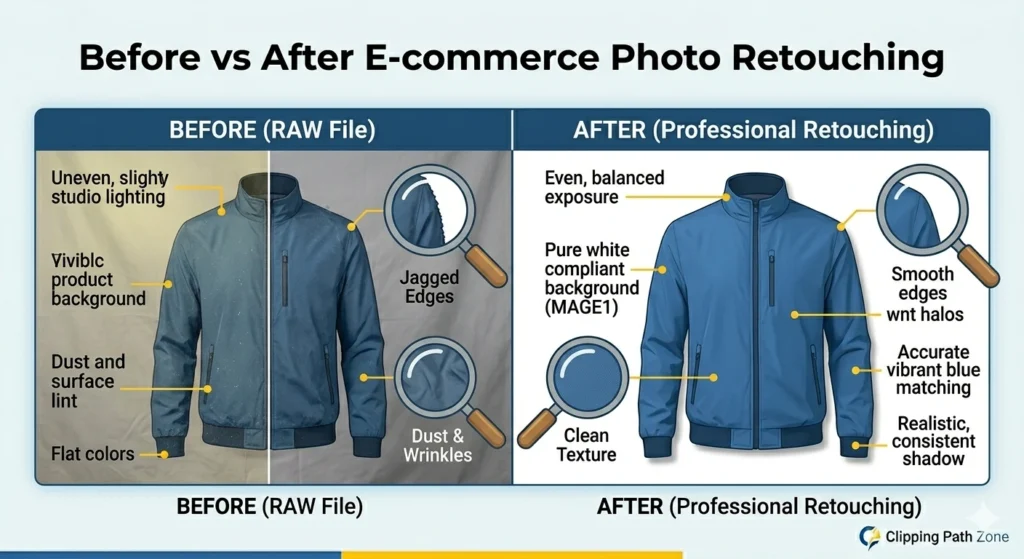
Understanding what changes during retouching helps you set the right standards.
Before retouching, a typical raw product image has:
- Uneven exposure and shadows from studio lighting
- Visible dust, lint, and surface scratches
- A non-compliant or uneven background
- Jagged or rough product edges
- Colour tones that differ across product variants
- No shadow or an unnatural existing shadow
After professional retouching, the same image has:
- A clean, compliant background — pure white or defined lifestyle
- Sharp, smooth product edges with no halo effects
- Consistent exposure matched to the catalogue reference
- Surface defects removed without destroying the texture
- A realistic, consistent shadow
- Accurate colour matched across all product variants
The conversion impact is measurable. Shoppers presented with clean, consistent product images show significantly higher purchase intent. The image builds confidence. Confidence converts.
1. Build a Standardised E-commerce Image Editing Workflow
Create Editing SOPs for Every Product Category
Before you edit a single image, build the system.
Apparel is edited differently from electronics. Jewellery needs different attention than furniture. Write a one-page standard operating procedure (SOP) for each product category. Include crop ratios, exposure targets, background specs, and retouching depth.
When every editor follows the same SOP, quality becomes predictable — not accidental.
Use Consistent Crop Ratios and Image Dimensions
Decide on your image dimensions before editing starts. According to Shopify’s image optimisation documentation, 2048 × 2048 px is the recommended product image size. Amazon’s seller image requirements specify a pure white background with the product filling at least 85% of the frame.
Lock these in from day one. Discovering the wrong specs after 500 images are already edited is an extremely costly mistake.
Standardise Lighting and Exposure Targets
Set a reference image for each product category. Every editor matches their output to that reference. This single habit eliminates most catalogue-level inconsistency caused by different editors making different exposure judgments.
Maintain Uniform Background Guidelines
White background? Specify the exact RGB value — 255, 255, 255 for Amazon compliance. Document it. Enforce it.
Backgrounds that vary even slightly across a catalogue look unprofessional — even when individual images look fine on their own.
Need end-to-end product image support? Our E-commerce Solution Service covers your entire catalogue pipeline.
2. Organise Product Files Before Retouching Starts
Use SKU-Based File Naming Systems
Name every file with the SKU code, angle, and version. Example: SKU-10234_FRONT_v1.jpg. This removes all ambiguity and eliminates version confusion across teams.
Create Structured Folder Hierarchies
Use a three-folder structure for every project:
- RAW — original files, never edited
- WIP — work in progress versions
- EXPORT — final, platform-ready files
Prevent Asset Confusion Across Teams
When multiple editors work on the same catalogue, clear file organisation is the only thing preventing chaos. Without it, duplicate work, overwritten files, and missed images become routine.
3. Use Professional Clipping Path Techniques for Clean Product Edges
Why Handmade Clipping Paths Still Matter
Automated background removal tools still fail on flyaway hair, transparent packaging, shiny surfaces, and complex shapes.
A skilled Photoshop editor using the Pen Tool creates edges that automation simply cannot match. For professional e-commerce images, handmade clipping paths remain the gold standard.
Complex Product Cutouts and Multi-Clipping Paths
Have products with multiple colour variants? Multi clipping paths let you isolate and recolour individual sections — like a handbag strap or a shoe sole — without re-shooting. This is a massive time and cost saver at scale.
Need pixel-perfect edges across thousands of SKUs? Our 24/7 production team delivers hand-edited results within 6–24 hours. See our Clipping Path Service, Multi Clipping Path, and Background Removal Service.
4. Maintain Colour Consistency Across the Entire Product Catalogue
Understanding Colour Drift in E-commerce Photography
Colour drift happens when images shot on different days end up with different colour tones in the final catalogue. Shoppers notice — even when they cannot explain why.
File Format Comparison for E-commerce
| Format | Best Use | Relative File Size | Transparency |
| JPEG | Product photos | Small | No |
| PNG | Transparent backgrounds | Large | Yes |
| WebP | E-commerce SEO delivery | Very small | Yes |
According to Google’s developer documentation, WebP images are typically 25–35% smaller than JPEG at equivalent visual quality. Smaller files improve Core Web Vitals scores. Better scores improve organic rankings.
Monitor Calibration Best Practices
Use a hardware calibration tool — such as a Datacolor Spyder or X-Rite i1Display — at least once a month. What you see on your screen must match what your customer sees on theirs.
Why sRGB Remains Essential for E-commerce
Always export in sRGB. Most web browsers and consumer devices display sRGB. Exporting in Adobe RGB without conversion causes colours to appear flat and dull on most screens.
Our Colour Correction Service ensures every image in your catalogue matches perfectly — regardless of when or where it was shot.
5. Combine Batch Editing with Human Retouching
What Batch Processing Handles Well
- Resizing images to platform specifications
- File renaming and compression
- Basic exposure adjustments on consistently lit shots
- Export formatting in WebP, JPEG, or PNG
What Only Humans Can Do
- Fabric texture correction on apparel
- Jewellery reflection and sparkle enhancement
- Realistic shadow creation and matching
- Complex background removal on irregular shapes
- Colour judgment across product variants
Shadow Type Comparison
| Shadow Type | Best For | Realism Level |
| Natural shadow | Lifestyle and studio shots | High |
| Drop shadow | White background catalogue | Medium |
| Reflection shadow | Minimalist product pages | High |
A hybrid workflow delivers both speed and precision. Neither approach alone achieves both.
AI vs Human Retouching: What Actually Works in 2026

This is one of the most searched topics in e-commerce image editing right now. Most guides get it wrong.
AI tools are not replacing human retouchers. They are changing what human retouchers focus on.
| Task | AI Tools | Human Retouchers |
| Simple background removal | Excellent | Excellent |
| Jewelry retouching | Weak | Excellent |
| Fabric detail and texture | Weak | Excellent |
| Colour judgment across variants | Inconsistent | Accurate |
| Catalog-wide consistency | Limited | Strong |
| Complex edge selection | Poor | Excellent |
| Shadow creation and matching | Poor | Excellent |
| Bulk resizing and export | Excellent | Slow |
The right model: Use AI for volume tasks. Use humans for quality-critical work. Use QA teams to catch what both miss.
Brands that use AI alone sacrifice quality. Brands that use humans alone sacrifice speed. The hybrid wins — every time.
6. Remove Imperfections Without Over-Retouching
Your goal is to remove dust, scratches, lint, and surface defects — not create a CGI product.
A leather bag should still look like leather. A wooden table should still show grain. Shoppers buy with confidence when the image looks like what they will actually receive.
Over-retouching is a real problem in e-commerce product image optimisation. Perfectly smooth products look fake. And fake-looking products do not sell.
See our Photo Retouching Service for professional, natural-looking results.
7. Create Consistent Shadows That Improve Product Realism
Shadows anchor a product visually. They communicate dimension, weight, and physical reality. Without a shadow, even a well-retouched product image can feel unconvincing.
Choose one shadow style per product category. Lock it in. Enforce it catalogue-wide.
Add realistic depth with our Shadow Creation Service.
8. Optimise Product Images for E-commerce Platforms
Platform Compliance Requirements
| Platform | Background | Recommended Size | Key Compliance Rule |
| Amazon | Pure white RGB 255,255,255 | 2000px minimum | Product fills 85% of the frame |
| Shopify | Flexible | 2048 × 2048px | Square aspect ratio preferred |
| WooCommerce | Theme-defined | Consistent per theme | Regenerate thumbnails when changed |
| Etsy | Clean, uncluttered | 2000px minimum | Lifestyle shots allowed |
| Walmart | White or light grey | 2000px minimum | No watermarks or text overlays |
| TikTok Shop | White background | 800 × 800px minimum | Square format required |
Amazon Image Suppression Risk
Amazon does not notify sellers when images are suppressed. According to Amazon’s seller central image guidelines, non-compliant main images — wrong background, product too small, watermarks present — result in automatic listing suppression from search.
Regular compliance audits across your catalogue are not optional. They are revenue protection.
Mobile-Friendly Product Image Optimisation
Over 60% of e-commerce traffic comes from mobile. Test every product image on a phone screen before publishing. What looks sharp on a desktop monitor can appear small and unclear on a 6-inch screen.
9. Build a Quality Control System for E-commerce Image Editing
A Simple 6-Point QC Checklist
- Edge accuracy — zoom to 200% and check every edge
- Background uniformity — no grey patches, no shadows bleeding through
- Colour consistency — compare against the reference image
- Product alignment — centred, consistent positioning across variants
- Mobile preview — view at phone resolution before approving
- Export validation — correct file format, dimensions, and file size
Assign QC to a dedicated reviewer — not the same editor who created the image. Fresh eyes catch what creators miss.
Need consistent quality control across thousands of SKUs? Our dedicated QA team reviews every image before delivery — zero exceptions.
10. Scale with Specialised Editing Teams
In-House vs Outsourced Editing Comparison
| Factor | In-House Team | Outsourced Partner |
| Cost structure | Fixed overhead | Per-image pricing |
| Scalability | Limited | Instantly scalable |
| Turnaround | Business hours only | 24/7 pipeline |
| Specialization | Generalist editors | Category specialists |
| Peak capacity | Bottlenecks quickly | Handles volume surges |
| Seasonal flexibility | Difficult | Immediate |
Specialisation increases both speed and quality simultaneously. A team operating across multiple time zones maintains a continuous editing pipeline — delivering results while your in-house team is offline.
This is especially critical during Black Friday preparation, fashion drop deadlines, Q4 launches, and major seasonal campaigns — where image delays translate directly into missed revenue windows.
11. Use Outsourcing Strategically for High-Volume E-commerce Editing
At some point, internal editing capacity hits a ceiling. Hiring more editors increases fixed overhead. Training takes weeks. Seasonal demand spikes create staffing problems.
That is when strategic outsourcing becomes not just practical — but necessary.
When to Consider Outsourcing
- Editing more than 200 images per day
- Turnaround times are slipping
- Quality is inconsistent across your catalogue
- A major product launch is approaching
- A high-traffic sales season is coming
Benefits of a Dedicated Retouching Partner
- Predictable cost per image — no overhead
- Instantly scalable capacity up or down
- Built-in quality control processes
- 6, 12, or 24-hour delivery options
Need consistent retouching across thousands of SKUs? Our 24/7 production team delivers hand-edited ecommerce images within 6–24 hours. See our E-commerce Solution Service.
E-commerce Retouching Challenges by Product Category
Generic advice only goes so far. Different products demand different skills.
Apparel
Fabric is difficult. Wrinkles must be reduced — but not eliminated. Texture must be preserved. Ghost mannequin editing removes the model or mannequin to create a clean, wearable silhouette. Colour accuracy is critical because customers return clothing when the colour does not match the screen.
Real Apparel Retouching Workflow
- RAW import into Capture One
- Exposure normalisation against the reference image
- Pen Tool clipping path for a clean garment edge
- Frequency separation for natural wrinkle reduction
- Ghost mannequin composite if required
- Shadow recreation for depth
- Export in sRGB WebP at platform spec
Jewelry
Jewellery is the hardest product category to retouch professionally.
Here is why failure rates are so high.
Metal surfaces reflect everything around them — the studio, the photographer, the ceiling. Gemstones require sparkle enhancement that must look natural, not painted on. And dust is catastrophically visible at the jewellery scale. A single fibre invisible to the naked eye becomes a glaring distraction at 200% zoom.
We estimate that jewellery retouching requires approximately 3–4 times the editing time of a comparable apparel image, with a significantly higher QC rejection rate on first pass.
No automation currently handles this reliably. It requires experienced human editors, every single time.
Furniture
Furniture images require consistent shadow depth to communicate physical scale. A sofa without a proper shadow looks like it is floating. Colour accuracy for wood tones and fabric upholstery is notoriously difficult — both must match exactly across every variant.
Cosmetics and Beauty
Cosmetics packaging often has reflective or semi-transparent surfaces. Colour accuracy is absolutely non-negotiable — a foundation shade that looks wrong online generates returns and bad reviews. Packaging reflections and label clarity both require careful manual retouching.
Professional Tools Used in E-commerce Photo Retouching
Adobe Photoshop: Still the industry standard for clipping paths, retouching, shadow creation, and background removal. The Pen Tool remains the most precise edge selection method available.
Adobe Lightroom / Capture One: Used for batch colour correction and white balance standardisation across large shoots. Capture One is preferred for tethered shooting and catalogue-level colour management.
Wacom Tablets: Professional retouchers use pressure-sensitive tablets for precise healing, cloning, and dodge/burn work. Mouse-based retouching at this level is significantly slower and less accurate.
Monitor Calibration Devices — X-Rite, Datacolor Spyder: Accurate colour correction is impossible without a calibrated monitor. Professional studios calibrate hardware monthly as a minimum standard.
For premium ecommerce catalogues, human expertise with these tools is not optional. It is the standard.
Common E-commerce Photo Retouching Mistakes to Avoid
| Mistake | Why It Hurts |
| Over-retouching | Products look fake and unconvincing |
| Inconsistent backgrounds | Breaks catalogue uniformity and brand trust |
| Mismatched shadows | Creates visual chaos across the catalogue |
| Wrong aspect ratios | Gets cropped or rejected on major platforms |
| Over-compressed images | Visible artefacts reduce perceived quality |
| Inconsistent product scaling | Jarring experience on product detail pages |
| Unrealistic colors | Leads to returns and negative reviews |
E-commerce Photo Retouching Trends in 2026
AI-Assisted Editing Is Growing — But Not Replacing Humans
AI tools handle simple, clean images reasonably well. They still fail on complex products. Human QA is becoming more critical as AI adoption increases — not less.
Faster Delivery Expectations
24-hour turnarounds are now standard. Same-day delivery for small batches is increasingly common. Speed is a competitive advantage — but only when quality is maintained.
Marketplace Image Compliance Is Rising
Amazon, Walmart, TikTok Shop, and major European marketplaces are tightening image compliance rules. Non-compliant images get suppressed from search. Proper retouching is now a listing health requirement — not just a visual preference.
Time-to-Market Is Now a Competitive Edge
Fashion brands are running weekly drops. Electronics brands are launching new SKUs daily. Beauty brands are hitting seasonal windows.
Image editing speed directly determines time-to-market. Brands with faster editing pipelines publish sooner, rank sooner, and sell sooner than competitors still waiting on their image backlog.
Black Friday preparation starts in August. Fashion season launches in weeks — not months. Building a fast, reliable retouching pipeline is not optional for competitive e-commerce brands in 2026.
Expert Tips for Maintaining E-commerce Image Quality at Scale
- Build repeatable systems first. Speed comes from process, not pressure.
- Prioritize catalog consistency over individual creativity. A uniform catalogue outperforms a collection of individually brilliant images.
- Use non-destructive editing workflows. Always work on adjustment layers. Never edit originals directly.
- Document every standard clearly. If it is not written down, every editor will interpret it differently.
- Review images in grid view. Catalogue-level inconsistencies are invisible image by image. They become obvious in a grid.
FAQ
What is e-commerce photo retouching?
E-commerce photo retouching is the professional editing of product images to make them clean, consistent, and platform-ready. It includes background removal, colour correction, shadow creation, surface defect removal, and image optimisation for e-commerce platforms.
Why is product image consistency important in e-commerce?
Consistent product images build visual trust. Shoppers are more likely to buy when a catalogue looks professional and uniform. Inconsistency signals low quality — even to shoppers who cannot consciously identify why something looks wrong.
Can batch editing fully replace manual retouching?
No. Batch editing handles volume tasks efficiently. But manual retouching is still essential for complex edges, colour accuracy, texture correction, and realistic shadows.
How do e-commerce brands manage thousands of product images?
They use standardised workflows, SKU-based file naming systems, specialised editing teams, and outsourced retouching partners — with 24-hour delivery pipelines to keep product launches on schedule.
What file format is best for e-commerce product images?
WebP is best for web delivery — 25–35% smaller than JPEG at equivalent quality, according to Google’s developer documentation. JPEG works for platforms that do not support WebP. PNG is best for transparent backgrounds.
How long does e-commerce image retouching take?
Simple background removal process in large batches within 24 hours. Complex jewellery or apparel retouching may take 48–72 hours per batch, depending on volume and revision requirements.
What causes colour inconsistency in e-commerce photography?
Different lighting conditions across shoots, uncalibrated monitors, incorrect ICC profiles, inconsistent white balance settings, and editors making different colour judgment calls without a shared reference standard.
Why are shadows important in product photography?
Shadows add dimension, weight, and physical realism. A flat product without shadow feels unconvincing. Consistent shadows improve perceived quality and shopper confidence across an entire catalogue.
Final Thoughts
The difference between a scalable ecommerce brand and a chaotic catalogue often comes down to one thing — image workflow discipline.
The brands that solve retouching scalability early launch products faster, rank better, and convert more customers — while competitors stay trapped in editing bottlenecks and rework cycles.
Scaling ecommerce photo retouching successfully requires more than editing skills alone. It requires systems, quality control, workflow discipline, and operational consistency at every stage of e-commerce image production.
Standardise your workflow. Organise your files. Use professional clipping paths. Maintain colour consistency. Combine automation with skilled human retouching. Build a real quality control process. Invest in proper platform compliance. And when volume exceeds your internal capacity, partner with a team that specialises in high-volume product catalogue management.
When those systems are built correctly, even catalogues containing thousands of SKUs maintain premium visual quality without slowing down a single product launch.
That is the standard we hold every catalogue to.
Ready to scale your e-commerce image editing without sacrificing quality?
Clipping Path Zone delivers hand-edited, platform-ready product images within 6–24 hours — with dedicated QA, unlimited revisions, and 24/7 support.
Get a free trial today and see the difference a professional retouching pipeline makes.
“Scaling ecommerce photo retouching successfully is not about editing faster alone. It is about building a repeatable workflow that protects product image quality while handling large catalogue volumes efficiently.”